The default way to use a congressional disclosure feed is to open it, see which name is at the top, and think about buying that name. It feels like research because you are looking at real data. It is not research, because the ordering of the feed is driven by whoever filed most recently and by the size of their paperwork, and neither of those has anything to do with whether the trade is worth copying.
The Heatmaps tab fixes the ordering problem by showing you the whole window at once instead of the most recent row. My rule is simple. Choose the cell before you choose the ticker. If you cannot say why a sector is interesting, you have no business picking a name inside it, and the heatmap makes that a thirty second decision rather than an hour of scrolling.
What a single tile is telling you
Each sector tile carries five things: a direction label in the corner, a buy count, a sell count, a USD notional, and five leading tickers on the bottom line. The window selector above the grid read 30 days on my capture, and the three view buttons beside it are Sector, Ticker and Committee Correlation.
Take the Information Technology tile. 81 buys, 106 sells, 4.80 M USD, tickers GEN, IT, ORCL, QCOM and QLYS, labelled Sell. That is 187 separate disclosed transactions in one sector in one month, which sounds like a lot of conviction until you notice that more of them were sales than purchases. Now take Utilities: 7 buys, 9 sells, 152.50 K USD, tickers AEE, CMS, AWK, NEE, PEG. Sixteen transactions. A whole sector of the US equity market, one month, sixteen disclosed trades.
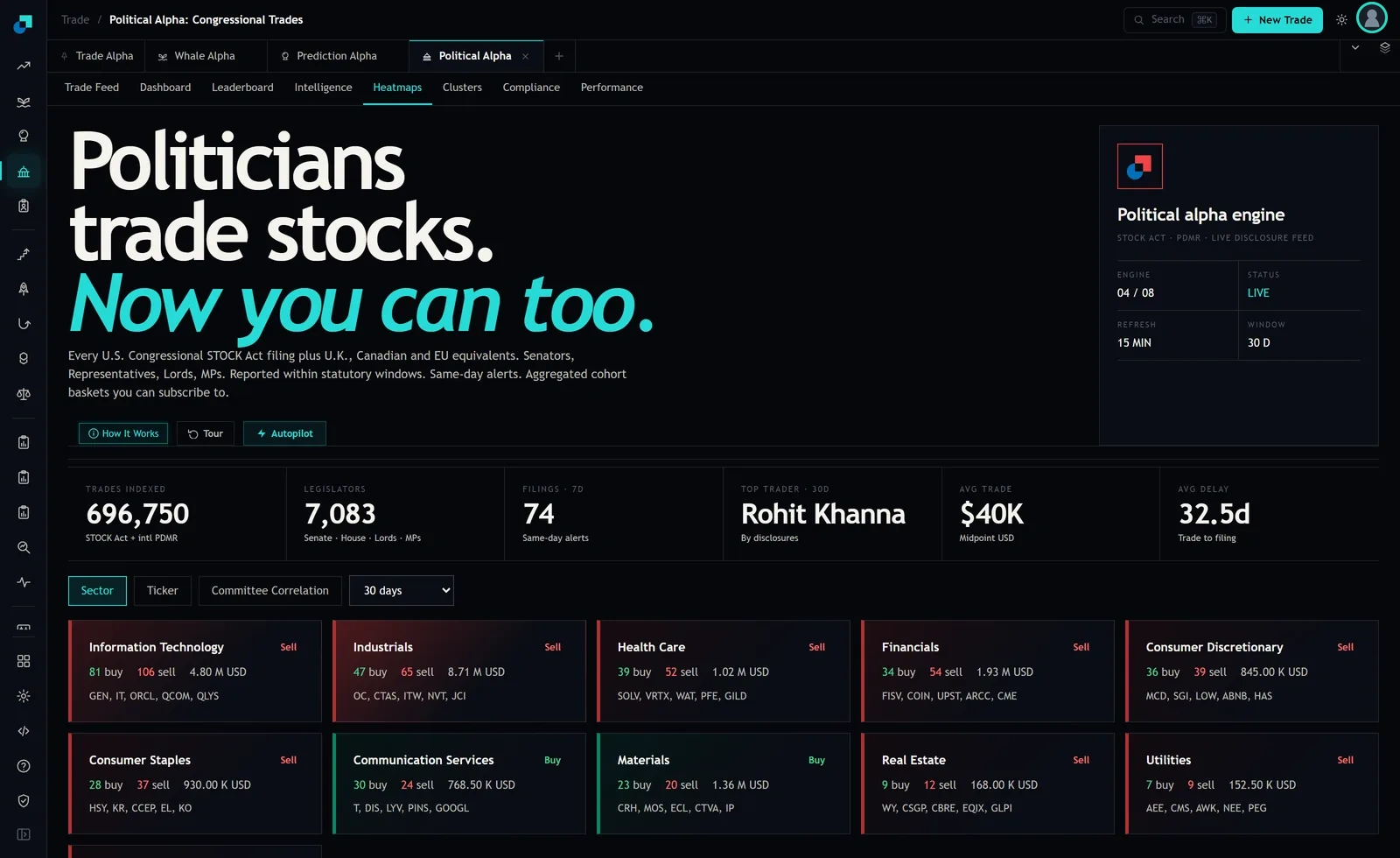
The reason the tile matters more than the row is that a single filing tells you one person did one thing. A tile tells you what a few hundred people did with their own money over a month, and the counts let you see immediately whether the sector was busy or empty. Sixteen transactions is not a signal about utilities. It is sixteen people doing sixteen unrelated things.
The window that produced two candidates instead of ten
Here is the whole grid as it read, sorted by transaction count. Information Technology 187 trades. Industrials 112. Health Care 91. Financials 88. Consumer Discretionary 75. Consumer Staples 65. Communication Services 54. Materials 43. Real Estate 21. Utilities 16. That is 752 transactions, of which 334 were buys and 418 were sells.
More sells than buys, in eight sectors out of ten. If you are a long-only retail investor, and most of us are, that means this particular month offered you two sectors to look at, not ten. Communication Services, where the leading names shown were T, DIS, LYV, PINS and GOOGL. And Materials, where they were CRH, MOS, ECL, CTVA and IP.
That is the entire value of doing it in this order. Ten minutes ago your candidate set was every ticker in a feed of hundreds of filings. Now it is two sectors and ten names, and you got there without forming an opinion about any individual legislator.
Two honest caveats. Ten tiles fitted on my screen and there are more sectors in the standard classification than that, so scroll to the bottom of the grid before you conclude a sector had no flow. And this reading is one month. Run it again next month and the two net-buying sectors will very likely be different ones, which is exactly why you should not build a story about why politicians love Materials.
Choosing the name inside the cell
The five tickers on a tile are the leading names in that sector for the window. They are your shortlist, not your answer, and the work of getting from five to one is ordinary work that the disclosure data does not do for you.
What I do, in order. First, drop anything I would not hold on its own merits, because a disclosure is a reason to look at a company and never a reason to own one. Second, check the ticker view. Switching the heatmap from Sector to Ticker regroups the same window by name, and a sector that looked broad on the sector tile sometimes turns out to be one ticker with a crowd around it. Third, look at the size. The header stat reports average trade size at $40K under the label Midpoint USD, which means disclosed amounts are ranges and the dollar figures you see are midpoint estimates of those ranges. A sector's notional can be large because one filing landed in a high bracket.
Then size the position like the ordinary equity position it is. If you would normally put 500 dollars into a single-name idea, this is a 500 dollar idea. The fact that it came off a congressional filing does not earn it a bigger allocation, and the temptation to size it up because it feels like inside information is the single most expensive mistake available in this module.
The check that stops you buying somebody's tax-loss sale
Before acting on a net-buying tile, spend two minutes asking whether the sells around it are informative or administrative.
The direction labels on this capture were overwhelmingly Sell, and a plausible chunk of that is housekeeping. People rebalance, they raise cash, they harvest losses, they liquidate a legacy account, they hand a portfolio to a manager who sells everything and starts again. None of that is a view on the company. Purchases are cleaner, because there are fewer administrative reasons to buy a specific stock than to sell one, which is the long-standing shape of the insider-disclosure literature generally and it applies here for the same reasons.
So when a tile shows Buy, ask what the buys look like underneath. Are they spread across several people and several tickers, or is one filer responsible for most of the count? Communication Services showed 30 buys and 54 transactions in total. If those 30 buys are five people buying six times each, it is a much weaker reading than thirty people buying once. The Clusters tab is where you check that, and it will also tell you whether the same name appears twice under one member.
When the heatmap-first order fails you
Two situations where I abandon this workflow rather than force it.
The first is a thin window. If the sector you like carries twenty transactions, the tile is not aggregating anything, it is displaying noise with a border around it. Real Estate at 21 trades and Utilities at 16 are in that category on this capture. Set yourself a floor, something like fifty transactions in the sector before you treat the tile as meaning anything, and accept that some months you will look at the grid and find nothing that clears it. That is a normal outcome and it is much cheaper than the alternative.
The second is the delay. The header reports average trade to filing delay at 32.5 days, so the month of activity on that grid is describing decisions taken, on average, a month before you saw them. If a sector already ran 15 percent while you were waiting for the paperwork, the tile is a description of the past and the tickers on it are exactly the names most likely to have moved. Pull up a chart of your candidate before you buy, and if it has already made the move the filings would have predicted, the trade has been taken. Put it on a watchlist and wait for the next window instead of paying up for a signal that expired while it was in transit.