Two completely different things look almost identical on a screen. In the first, your position closed. In the second, the software lost the ability to tell you about a position that is still open, still moving, and still yours.
Those two situations demand opposite responses, and people get them backwards under pressure. Somebody who believes they were stopped out when they were not will happily re-enter and end up with double the size they intended. Somebody who believes they are still in when the position closed will sit watching a chart with no exposure at all. The way to avoid both is to know, before it happens, what a connection actually is.
What a broker link is, and what it is not
A connection between Blockcircle and your venue is a credential the platform uses to place orders and to read your account. The Brokers page says so plainly: connect your crypto exchanges and stock brokers to execute trades directly from Trade Alpha signals, with credentials encrypted through Google Cloud KMS, and the footer of the catalog section reads trade-only keys.
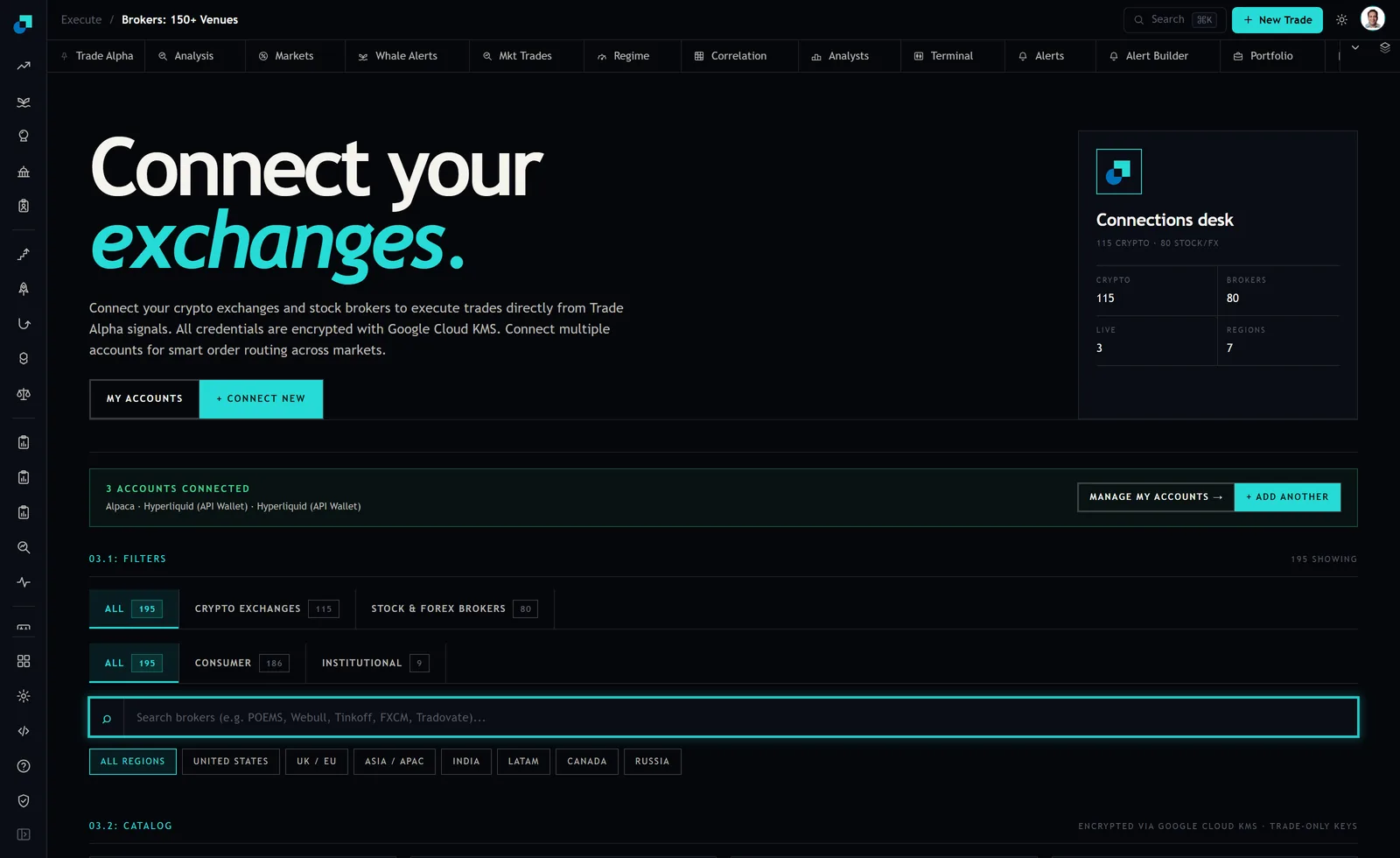
Read the counters in that screenshot for what they are. The Connections desk panel showed 115 crypto and 80 brokers in the catalog, 3 live, and 7 regions, with the catalog filters below reading 195 showing, split into 115 crypto exchanges and 80 stock and forex brokers. The strip in the middle names the three accounts connected at capture.
All of that describes the link. None of it describes your position, because your position does not live in Blockcircle. It lives at Alpaca, or at the exchange, in an account with your name on it. The platform is a courier. When the courier stops arriving, the thing it was carrying messages about is unaffected.
That single fact resolves most of the panic. A link dropping does not close a trade. It cannot. It has no mechanism to.
The three things that can be true when the screen goes quiet
When your positions stop updating, exactly one of these is happening, and they need different actions.
The link is down and your position is untouched. This is by far the most common case. Something in the credential path broke: a key expired or was rotated, an IP allowlist changed, a permission was edited, the venue is in maintenance, or you changed your account password and the venue invalidated the keys as a side effect. The position at the venue carries on exactly as before.
The position genuinely closed while the link was fine. A stop resting at the venue was hit, a take profit filled, or on a leveraged product you were liquidated. The venue did this, not the platform, and the venue has a record of it.
The link is down and the position also closed, independently. Rare, but it happens precisely because the conditions that break connections, such as a violent move and a venue under load, are the same conditions that trigger stops. Do not assume the two are related, and do not assume they are not.
The order to check, starting where the truth is
Go to the venue first. Not to the platform, not to a mobile notification, not to a chart. Log in to the exchange or broker directly and look at two screens: your open positions and your open orders.
Open positions answers the only question that matters right now, which is whether you have exposure. Open orders answers the second question, which is whether your protection is still standing. Together they take about forty seconds and they are authoritative in a way that nothing else on your screen is.
If the position is there and the protective orders are there, you have a display problem and not a trading problem. Do nothing to the position. Fix the connection afterwards, with your hands off the mouse in the meantime.
If the position is there and the protective orders are not, you have an unprotected position and that is the emergency. Place the protection manually at the venue, right there, before doing anything else.
If the position is gone, find the fill in the venue's trade history and read the price and the time. Now you know what happened rather than inferring it, and you can decide about re-entry as a fresh decision at a current price rather than as a reaction.
Only after all of that, go back and re-establish the link. On the Brokers page that is the manage accounts path, and the usual fix is issuing a fresh key at the venue rather than anything on the platform side.
One rule while you are doing this, and it has no exceptions. Nobody needs your API key, your secret, your password or your recovery phrase to help you with a connection problem. Not support, not a moderator, not anyone in a chat who noticed you asking. If you think a key has been exposed, revoke it at the venue and issue a new one. You never repair a credential by sending it to someone.
Where your stop is resting decides how bad this is
This is the part worth ten minutes of your time on a calm afternoon, because it is the difference between an inconvenience and a real loss.
A protective order can live in one of two places. It can rest at the venue as a real working order, in which case it is in the venue's order book and it will execute whether or not any software you use is running. Or it can be managed by something outside the venue, which watches the price and sends an order when a level is reached. The second kind depends entirely on the watcher being connected.
These look identical on most dashboards and behave completely differently the moment a link drops. So do not reason about it, verify it. Open a small position, place your usual protective order the way you always place it, and then look at the venue's own open orders screen. If the order is listed there, it is resting at the venue. If the venue shows nothing while your platform shows a stop, then that stop depends on the connection.
Do this once per venue and once per order type, because the answer can differ between them, and write the result down. I am not going to tell you what the answer will be for your particular setup, because it depends on the venue and on how you placed the order, and asserting it without checking is exactly how people end up unprotected.
If it turns out a protection you rely on is connection-dependent, that is not necessarily wrong. It just means your position size has to be set on the assumption that the stop might not fire, because occasionally it will not.
The setup that makes a dropped link a non-event
Four things, none of which take long, and together they turn this from an emergency into an annoyance.
Keep protective orders resting at the venue wherever the venue supports them. An order in the book does not care about your internet connection, your laptop, or any platform's uptime.
Be able to reach every venue independently. You should have working credentials and a working two-factor setup for each account, tested recently, that has nothing to do with the platform you normally trade through. If the only way you can see your money is through one piece of software, then that software's availability is now part of your risk, and it does not need to be.
Keep the permissions on your execution keys narrow. The Brokers page describes trade-only keys, and that is the right shape. An execution credential should be able to trade and to read, and it should not be able to withdraw. Keep the assets you are not actively trading somewhere separate from the venue you route orders through, so that a problem at one venue is a trading problem rather than a solvency one.
And size positions so that a stop failing to fire is survivable. The capture showed three accounts connected across two different venues, which is a sensible shape for a different reason: it means a problem at one of them leaves you with somewhere to trade. What it does not do is protect the position sitting at the venue that broke. Only the size you chose does that.